
Tagged: remove listing
- This topic has 10 replies, 2 voices, and was last updated 10 years, 5 months ago by BePro Software Team.
-
AuthorPosts
-
November 15, 2015 at 6:45 pm #7455nanettedpMember
Is there a way that users can delete their own listings? let say someone list a classified ad and the item is sold, Can that individual delete the listing without doing it via admin?
November 16, 2015 at 7:34 am #7465BePro Software TeamKeymasterHello,
Users can delete their listings from their My Listings page. Use the shortcode builder or review our shortcode documentation to use the My Listings page
– https://www.beprosoftware.com/documentation/bepro-listings-shortcode-builder/
– https://www.beprosoftware.com/documentation/bepro-listings-shortcodes/
___
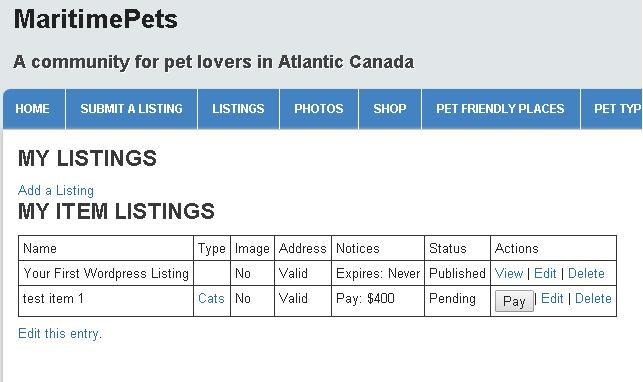
BePro Software TeamApril 20, 2016 at 3:11 pm #8247nanettedpMemberThanks I found the my listing page. And I used the [bl_my_listings] shortcode. I can view the listings but how will the user edit it. If I select the item button it just gives a detailed listing page with no option to edit.
April 20, 2016 at 5:46 pm #8249BePro Software TeamKeymasterHi,
Every listing on the My Listings page will have edit, delete and view as options. This can be seen on the following images
– https://www.beprosoftware.com/wp-content/uploads/2013/06/bepro_listings_payments.jpg
– https://ps.w.org/bepro-listings/assets/screenshot-5.jpg?rev=1149790If you do not see these options then try out troubleshooting tips
– https://www.beprosoftware.com/documentation/troubleshooting-bepro-listings/
___
BePro Software TeamMay 1, 2016 at 6:53 am #8272nanettedpMemberThanks, I deactivated all non BePro plugins and it worked perfectly. I then added one plugin at a time and identified that it is Buddypress that is causing the problem with displaying the my listings edit-delete options. I use BuddyPress 2.5.2. My entire site is based on this Buddypress community plugin so it is not an option to not use it unfortunately…. I was also under the impression that Bepro and Buddypress are compatible with each other? My buddypress selection under BePro Listings<Options<third party is selected. Please advise how I can fix the issue.
May 1, 2016 at 7:01 am #8273nanettedpMemberIf I unchecked the buddypress selection checkbox under BePro Listings<Options<third party then everything works perfectly. What is the function of this tickbox? I am concerned that un-selecting this option that it will have an impact on something else?
May 2, 2016 at 1:27 pm #8274BePro Software TeamKeymasterHi,
Do you have buddypress installed?
___
BePro Software TeamMay 2, 2016 at 3:30 pm #8276nanettedpMemberYes, BuddyPress 2.5.2 is installed
May 2, 2016 at 11:27 pm #8277BePro Software TeamKeymasterHi,
Then you should
1) Leave the option selected
2) Stop using the My listings page
3) Send users to the Buddypress profile page where they can manage their listings___
BePro Software TeamMay 3, 2016 at 4:58 pm #8281nanettedpMemberThanks I see it now. I am just concerned that it is not very visible…. so if I would want to make a custom URL for this listing page in my main menu how would I go about doing that?
May 4, 2016 at 12:46 pm #8285BePro Software TeamKeymasterHi,
The link is dynamic based on the username. You would have to talk to the buddypress people about that. They have multiple profile tabs that work the same way, so i’m sure they have had the question before.
___
BePro Software Team -
AuthorPosts

- You must be logged in to reply to this topic.